> For the complete documentation index, see [llms.txt](https://docs.bdb.ai/administrative-settings-5/llms.txt). Markdown versions of documentation pages are available by appending `.md` to page URLs; this page is available as [Markdown](https://docs.bdb.ai/administrative-settings-5/admin-panel-options/git-migration/migrating-ds-lab.md).
# Migrating DS Lab
This Admin option allows to migration of Notebooks, Models, and Project (Repo Sync) from the Data Science Lab.
The GIT Migration Admin option allows the users to import exported Notebook, Models, and Repo Sync Projects from the Data Science Lab module.
{% hint style="info" %}
*Please refer to the* [***Exporting a Project***](https://docs.bdb.ai/data-science-lab-4/repo-sync-project/project-list/project-migration#exporting-a-project) *page to understand the export repo sync project functionality.*
{% endhint %}
## Importing a Project
The user can import an exported repo Sync project from a different space by following the given set of steps:
* Navigate to the ***Admin Module.***
* Click the ***GIT Migration*** icon from the side navigation bar.
* Click the ***Import file*** option that appears.
* Click the ***Import*** option from the Import Document page.
* The ***Document Import*** page opens.
* Select the ***New VCS*** option.
* Choose the ***Dslabs*** module.
* Click the ***Project*** from the ***Migration- Document Import*** drop-down menu.
{% hint style="info" %}
*Please Note: The **DS Lab** module appears as **Dslabs** to import documents.*
{% endhint %}
* Use the search bar to Search for a specific Project from the displayed list.
* Click the ***Project*** from the displayed list.
* Available versions of the selected Project appears on the right side of the page.
* Select a version of the ***Project*** by putting a checkmark in the given checkbox.
* The ***Project name*** and ***Project URL*** will be displayed below.
* Select a branch using the Branch drop-down option.
* Click the ***Migrate*** option.
* A notification message appears to ensure that the file is migrated successfully.
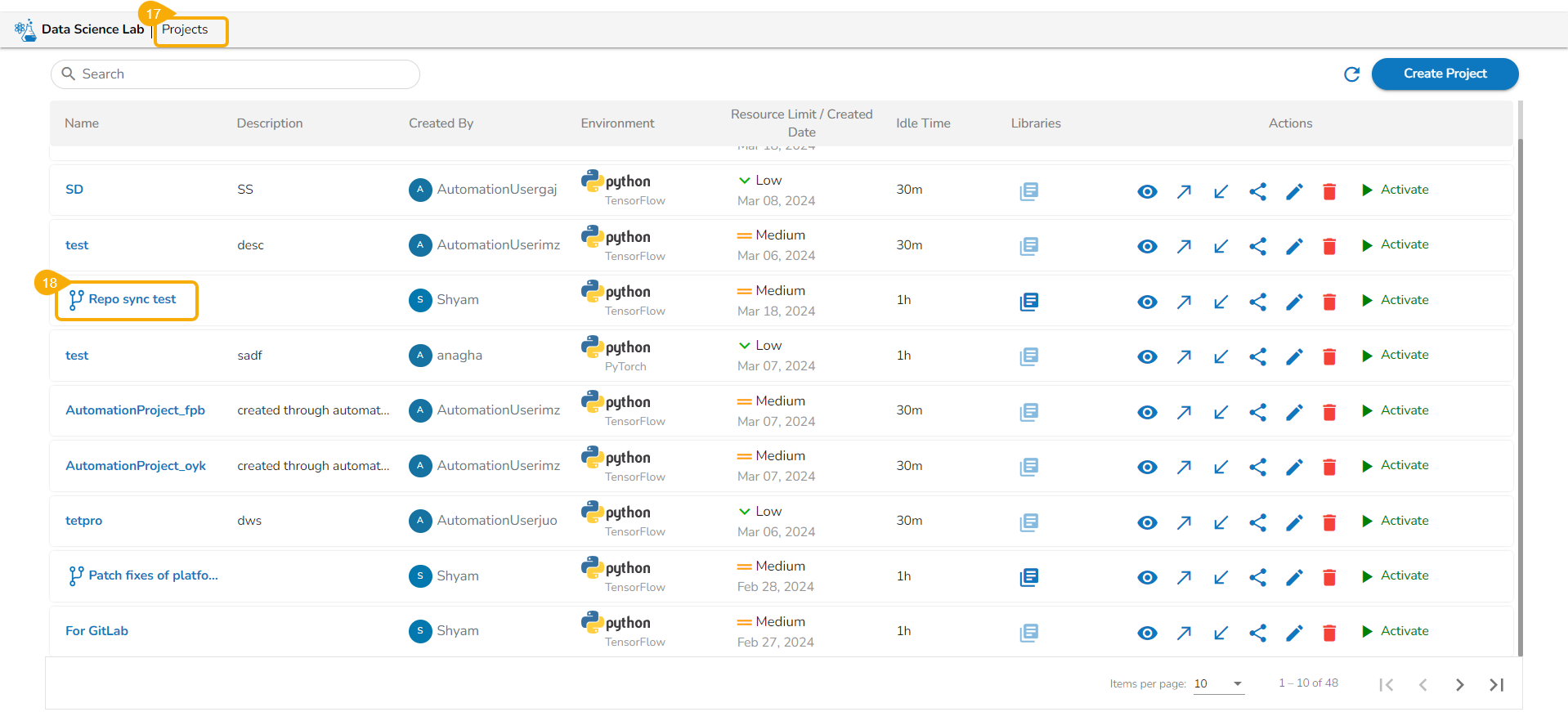
* Navigate to the ***Projects*** page of the Data Science Lab module.
* The migrated Project gets added at the top of the ***Projects*** list.
{% hint style="info" %}
*Please Note:*
* *Refer to the* [*Importing a DSL Script from GIT*](https://docs.bdb.ai/data-science-lab-5/tabs-for-a-dsl-project/workspace/workspace-folders/repo-folder-attributes/notebook-actions/notebook-version-control#import-a-dsl-script-from-git) *section under the Notebook Version Control page to import an exported Data Science Notebook/ Script.*
* *Refer to the*[ *Import a DSL Model*](https://docs.bdb.ai/data-science-lab-5/tabs-for-a-dsl-project/model/export-to-git-model-migration) *page to understand the steps to import an exported Data Science Lab model.*
{% endhint %}