# Actions for .ipynb Files

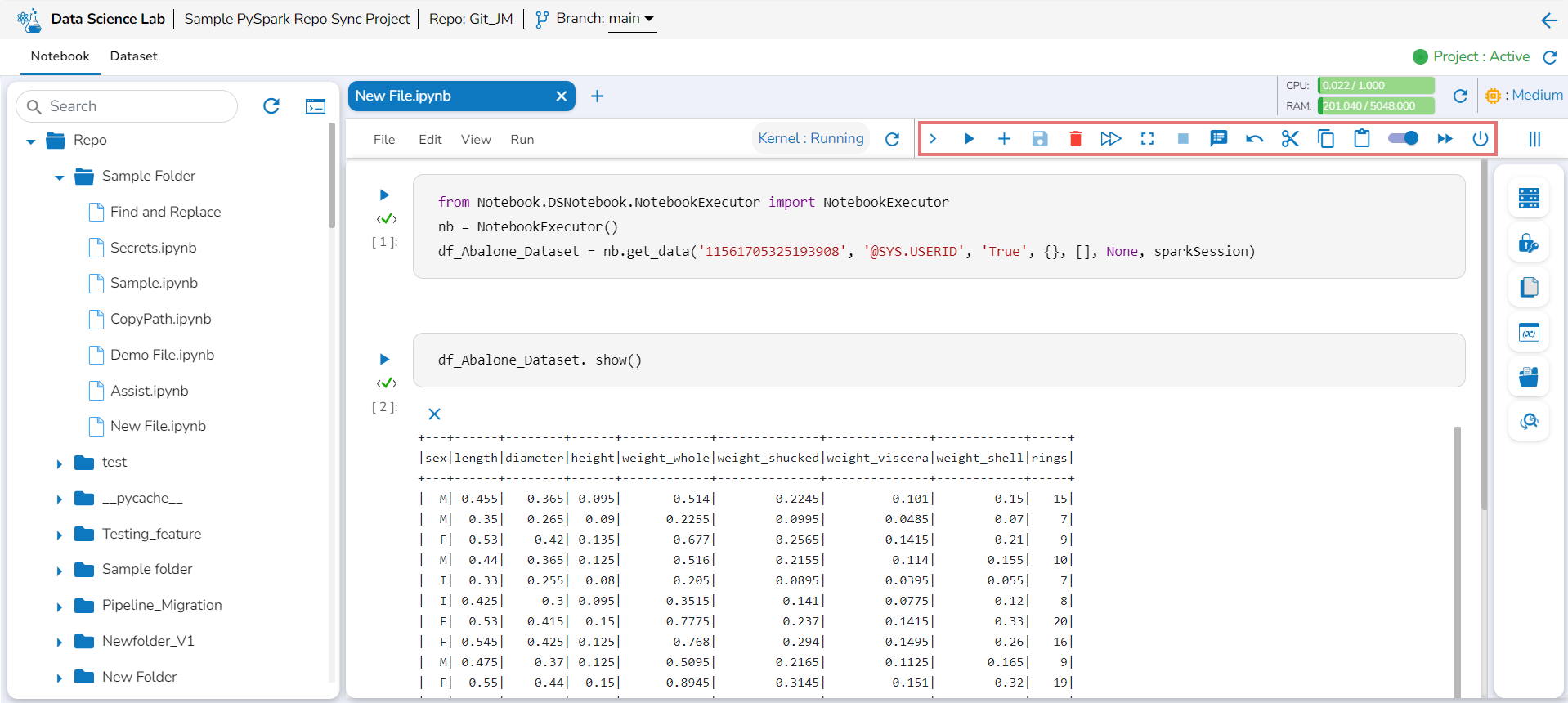
The Action icons (as highlighted in the below given image) help to apply various actions to the code/ code cell when clicked. They are provided on the top right side of the  page.

<figure><img src="https://4082649235-files.gitbook.io/~/files/v0/b/gitbook-x-prod.appspot.com/o/spaces%2F1QeOywZjV1cHo55cMW8u%2Fuploads%2FHAsBtgsZSSmOVwram7QS%2Fimage.png?alt=media&#x26;token=555f04f3-08ac-4b20-95bf-4bea264a4c6e" alt=""><figcaption><p> <em><strong>Action icons provided in the Menu Bar for a .ipynbfile</strong></em></p></figcaption></figure>

The below given table lists all the Actions available in the Notebook Menu Bar:

<table data-header-hidden><thead><tr><th width="168.33333333333331"></th><th width="196"></th><th></th></tr></thead><tbody><tr><td><strong>Icon</strong></td><td><strong>Icon Name</strong></td><td><strong>Action</strong></td></tr><tr><td><img src="https://content.gitbook.com/content/1QeOywZjV1cHo55cMW8u/blobs/7AzX8bQ7LmaOCtxgiXYB/image.png" alt="">/ <img src="https://content.gitbook.com/content/1QeOywZjV1cHo55cMW8u/blobs/X78peEXw8YngihKcqnYP/image.png" alt=""></td><td>Expand / Collapse</td><td>Expands or collapses the Actions Menu Bar.</td></tr><tr><td><img src="https://content.gitbook.com/content/1QeOywZjV1cHo55cMW8u/blobs/7CP1nYqfGL3jrnr6Jp3j/image.png" alt=""></td><td>Run Current cell</td><td>Runs code given for a specific cell.</td></tr><tr><td><img src="https://content.gitbook.com/content/1QeOywZjV1cHo55cMW8u/blobs/xO2t1aFhxWmLQMl3URsw/image.png" alt=""></td><td>Add Pre cell</td><td>Adds a code cell before the first cell. </td></tr><tr><td><img src="https://content.gitbook.com/content/1QeOywZjV1cHo55cMW8u/blobs/58qJ8tqHG4ewaTMbnEI0/image.png" alt=""></td><td>Save</td><td>Saves the Notebook updates.</td></tr><tr><td><img src="https://content.gitbook.com/content/1QeOywZjV1cHo55cMW8u/blobs/EBJy4qiIlEvayIrTd26t/image.png" alt=""></td><td>Delete cell </td><td>Removes the selected cell.</td></tr><tr><td>​​<img src="https://content.gitbook.com/content/1QeOywZjV1cHo55cMW8u/blobs/IxZJjXrDOdXTQJyuS17J/image.png" alt=""></td><td>Restart kernel</td><td>Restarts the kernel by killing the current session and creates a new session.</td></tr><tr><td><img src="https://content.gitbook.com/content/1QeOywZjV1cHo55cMW8u/blobs/dC923LLAGX1UCahjT4gU/image.png" alt=""></td><td>Interrupt cell</td><td>Interrupts the running cell</td></tr><tr><td><img src="https://content.gitbook.com/content/1QeOywZjV1cHo55cMW8u/blobs/JCvUR89iofxUxY4l5NZn/image.png" alt=""></td><td>Logs</td><td>Opens Logs window to display logs.</td></tr><tr><td>​​<img src="https://content.gitbook.com/content/1QeOywZjV1cHo55cMW8u/blobs/RzMCvmkIGocx74ktAtpt/image.png" alt=""></td><td>Undo Delete cell</td><td>Reverts the Deleted cell.</td></tr><tr><td>​​<img src="https://content.gitbook.com/content/1QeOywZjV1cHo55cMW8u/blobs/5D4eyQZ6QgBoUnGJjgQV/image.png" alt=""></td><td>Cut cell</td><td>Cuts the code from a specific cell.</td></tr><tr><td>​​<img src="https://content.gitbook.com/content/1QeOywZjV1cHo55cMW8u/blobs/PCNp3Q1ToDUtC6qao0pq/image.png" alt=""></td><td>Copy cell</td><td>Copies the code from a specific cell.</td></tr><tr><td>​​<img src="https://content.gitbook.com/content/1QeOywZjV1cHo55cMW8u/blobs/ep6k07peDivQYqTBm3me/image.png" alt=""></td><td>Paste cell</td><td>Pastes the cut or copied code to the selected cell.</td></tr><tr><td><img src="https://content.gitbook.com/content/1QeOywZjV1cHo55cMW8u/blobs/vFDvSnlFgQh7iwC3AMGN/image.png" alt="">/ <img src="https://content.gitbook.com/content/1QeOywZjV1cHo55cMW8u/blobs/tIFceRDBIpnvgBGJQu8h/image.png" alt=""></td><td>Auto Save</td><td>Auto-saves the Notebook updates when enabled.</td></tr><tr><td>​​<img src="https://content.gitbook.com/content/1QeOywZjV1cHo55cMW8u/blobs/1azUPQV5t6eLFSJann4J/image.png" alt=""></td><td>Run all cells</td><td>Runs the codes for all the cells.</td></tr><tr><td>​​<img src="https://content.gitbook.com/content/1QeOywZjV1cHo55cMW8u/blobs/efNtnLjISCd1Js0hkdNv/image.png" alt=""></td><td>Shutdown</td><td>Stops the Kernel/Disconnects the instance and allocated resources.</td></tr></tbody></table>

{% hint style="info" %}
*<mark style="color:green;">Please Note:</mark>*&#x20;

* *The other file types will contain the Taskbar, but the task icons will not be enabled.*
* *Refer the* [***Data Science Lab Quick Start Flow***](https://docs.bdb.ai/data-science-lab-4/data-science-lab-quick-start-flow) *page to get an overview of the **Data Science Lab** module in nutshell.*&#x20;
  {% endhint %}
