# Accessing Survey Module

* Navigate to the BDB Platform homepage.
* Open the ***Apps*** menu.
* The ***Survey*** module gets listed in the Apps menu. Click the ***Survey*** module.

<figure><img src="https://3438862083-files.gitbook.io/~/files/v0/b/gitbook-x-prod.appspot.com/o/spaces%2FwZ0CjAdrau4jYkEW8pa4%2Fuploads%2FkSuOP3oVyD1KZsQJIi7o%2Fimage.png?alt=media&#x26;token=c07dc82f-9e70-4840-b486-1300a9a54f92" alt=""><figcaption><p><em>Accessing the Survey module from the Apps Menu</em></p></figcaption></figure>

* The ***landing page*** of the Survey module opens with following options:
  * Create Survey option
  * List of the created Surveys

<figure><img src="https://859511478-files.gitbook.io/~/files/v0/b/gitbook-x-prod.appspot.com/o/spaces%2FGDmsjfjJBNqow7Fo97cO%2Fuploads%2Ff3pWlOWcfxSHsB5TLBEv%2Fimage.png?alt=media&#x26;token=524e0f67-ab63-42c8-840c-6d356a001c8e" alt=""><figcaption><p><em>Default Survey Landing Page.</em></p></figcaption></figure>

*Please Note: The Mobile Trends Survey and Customer Feedback surveys display by default on the Survey Landing page.* Other options provided on the Survey Landing page are as mentioned below:

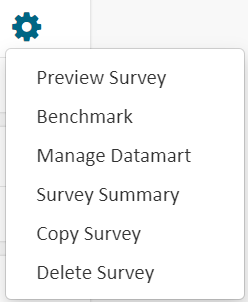
<table data-header-hidden><thead><tr><th width="123.33333333333331"></th><th width="220"></th><th></th></tr></thead><tbody><tr><td>Icon</td><td>Name</td><td>Task</td></tr><tr><td>​<img src="https://859511478-files.gitbook.io/~/files/v0/b/gitbook-x-prod.appspot.com/o/spaces%2FGDmsjfjJBNqow7Fo97cO%2Fuploads%2Fo7Fmw7YwFMHcnsXxGONp%2Fimage.png?alt=media&#x26;token=56f01d0e-88e3-4562-bdbd-6e549d58723d" alt="">​</td><td>Content Menu icon</td><td>Provides the following options: 1. Contacts 2. Survey Templates<img src="https://859511478-files.gitbook.io/~/files/v0/b/gitbook-x-prod.appspot.com/o/spaces%2FGDmsjfjJBNqow7Fo97cO%2Fuploads%2Fdn5Soz7XC9OlbK2FFrYl%2Fimage.png?alt=media&#x26;token=b62e50a3-7093-4662-8751-29f1594eac1b" alt="">​</td></tr><tr><td>​<img src="https://859511478-files.gitbook.io/~/files/v0/b/gitbook-x-prod.appspot.com/o/spaces%2FGDmsjfjJBNqow7Fo97cO%2Fuploads%2F55LV20w5J1XMJyrZYVaQ%2Fimage.png?alt=media&#x26;token=1c717e74-ee2e-41f6-ab35-409a74bfefe0" alt="">​</td><td>Design</td><td>Redirects to the Design page of the selected Survey</td></tr><tr><td>​<img src="https://859511478-files.gitbook.io/~/files/v0/b/gitbook-x-prod.appspot.com/o/spaces%2FGDmsjfjJBNqow7Fo97cO%2Fuploads%2FCVFFW8TIYsrnxgj4t0uy%2Fimage.png?alt=media&#x26;token=fed62d4d-3139-46d3-a7c3-d6766dbb3a21" alt="">​</td><td>Publish</td><td>Redirects to Publish the selected Survey</td></tr><tr><td>​<img src="https://859511478-files.gitbook.io/~/files/v0/b/gitbook-x-prod.appspot.com/o/spaces%2FGDmsjfjJBNqow7Fo97cO%2Fuploads%2FrZf8PYSyllKagbZ5XWw2%2Fimage.png?alt=media&#x26;token=a46ead87-4148-4a9e-9ea0-d853655a66e8" alt="">​</td><td>Analyze Result</td><td>Redirects to the Analyze page of the selected Survey</td></tr><tr><td>​<img src="https://859511478-files.gitbook.io/~/files/v0/b/gitbook-x-prod.appspot.com/o/spaces%2FGDmsjfjJBNqow7Fo97cO%2Fuploads%2FpdkDJ8qFULycG3Z6pjVF%2Fimage.png?alt=media&#x26;token=6a925f94-5a4a-47b1-a5be-f0eeac354840" alt="">​</td><td>More Options</td><td><p>Opens a Context menu with the following options:</p><ol><li>Preview Survey Benchmark</li><li>Manage Datamart</li><li>Survey Summary</li><li>Copy Survey</li><li>Delete Survey</li></ol><p>​<img src="https://859511478-files.gitbook.io/~/files/v0/b/gitbook-x-prod.appspot.com/o/spaces%2FGDmsjfjJBNqow7Fo97cO%2Fuploads%2FdRi2QY31ccluSxiTUlut%2Fimage.png?alt=media&#x26;token=45af6ccb-399a-48bd-a798-695443aaf39e" alt=""></p></td></tr></tbody></table>