# Deleting a Workspace
This section describes steps to delete an existing Workspace and restoring the deleted workspace.
## Removing a Workspace
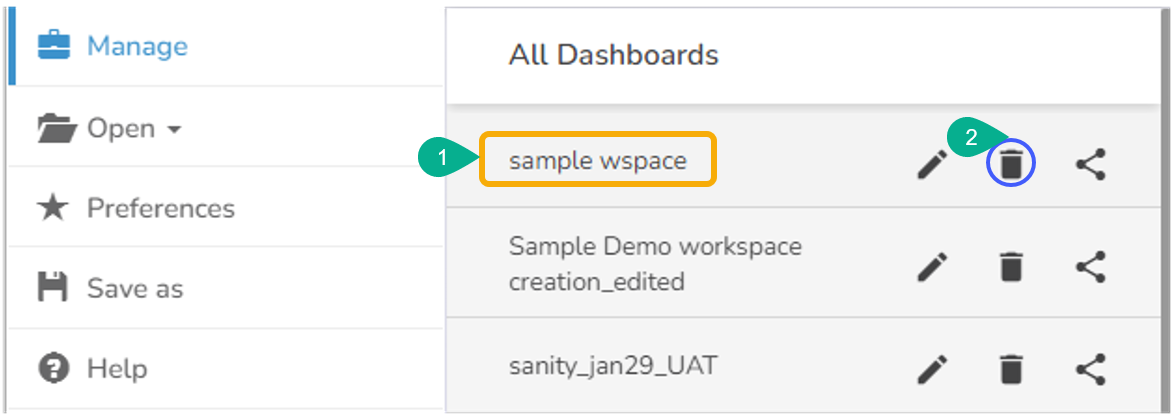
* Select a workspace from the ***Workspaces*** list.
* Click the ***Remove*** icon.
* The ***Remove*** dialog window appears to confirm the deletion.
* Click the ***Remove*** option.

* The selected workspace gets removed from the list.
* The removed workspace gets added to the Trash Workspace.
Confirmation message after a Workspace gets deleted
## Restoring a Deleted Workspace
* Click the ***Manage*** option.
* Navigate to the ***Trash*** workspace created under the list of all the workspaces.
* Select a deleted workspace that you want to restore and click the ***Restore*** icon.
Restoring the Deleted Workspace
{% hint style="info" %}
*Please Note:*
* *Removing a workspace causes the default removal of all the dashboards saved under it into the **Trash** workspace.*
* *Click the **Reload Workspaces** icon provided next to the Workspaces list to load all the workspaces again.*
* *Click the **Restore** icon from the **Trash** workspace to restore deleted workspaces.*
* *Click the **Remove Permanently** icon from the Trash workspace to delete a workspace or dashboard permanently.*
{% endhint %}