> For the complete documentation index, see [llms.txt](https://docs.bdb.ai/governed-dashboards-5/llms.txt). Markdown versions of documentation pages are available by appending `.md` to page URLs; this page is available as [Markdown](https://docs.bdb.ai/governed-dashboards-5/create-new-workspace/creating-a-workspace.md).
# Creating a Workspace
This section explains the steps on how to create a new Workspace in the Designer module.
* Navigate to the Dashboard Designer homepage.
* Click ***New*** or click the ***Add*** option.
* Click ***Workspace*** from the context menu.
Accessing the Workspace option to create a new Workspace
* A dialog box appears.
* ***Workspace Name:*** Enter a title for the Workspace in the given field.
* Click the ***Save*** option.
Creating a New Workspace
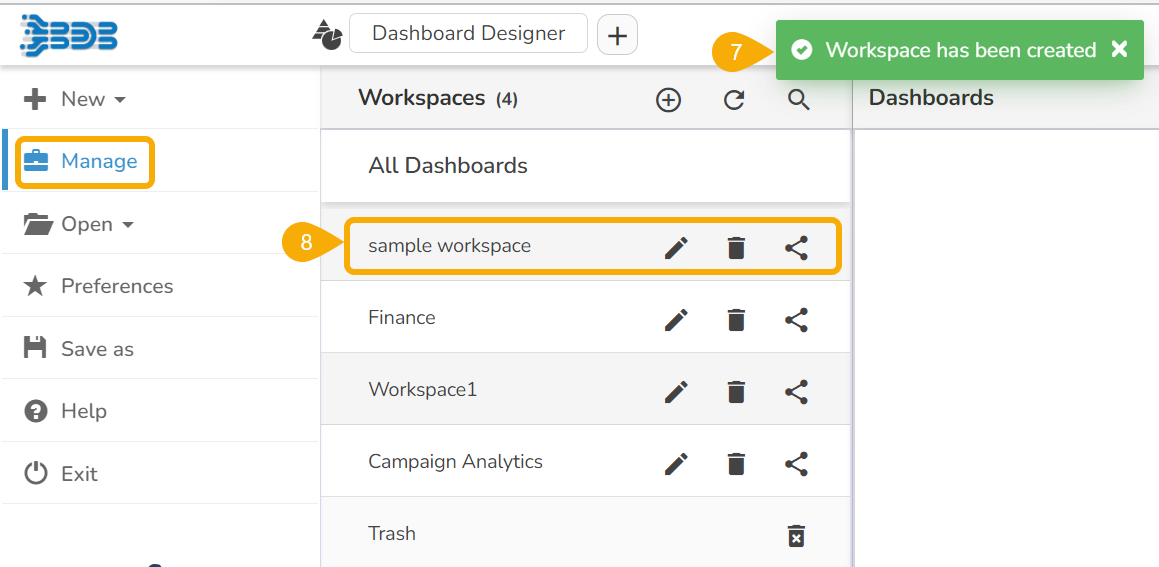
* A confirmation message appears to inform the creation of a new Workspace.
* The newly created workspace gets saved under the list of the existing ***Workspaces*** (The list of the Workspaces can be seen under the ***Manage*** option).