# Create Connection
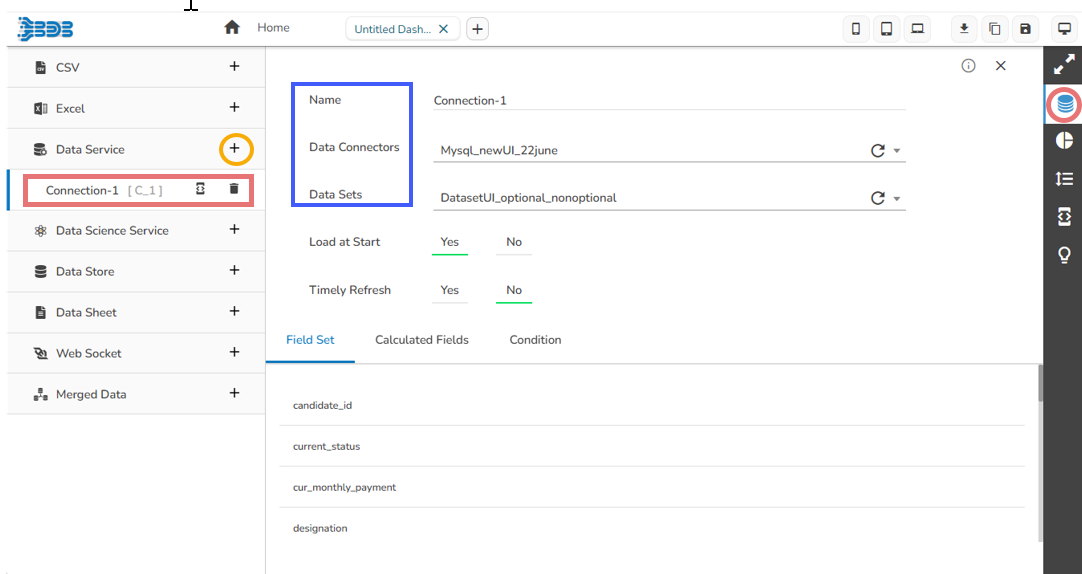
* Click the **Data Connectors** icon to display all the available data sources.
* Click the **Create New Connection** icon provided next to the **Data Service** connector.
* A new connection gets added under the Data Service connector type.
* **Name:** Name the connection.
* **Data Connectors:** Select a data source from the drop-down menu.
* **Data Sets:** Select a data service from the drop-down menu.
Creating a data connection
{% hint style="info" %}
*Please Note: The connection creation part based on all the available data sources is described under the* [***Establishing a Data Connection***](https://docs.bdb.ai/7.6/data-visualization/governed-dashboards/connecting-to-a-data-source/establishing-a-data-connection)*.*
{% endhint %}