# Legend Mapping

{% hint style="success" %}
*Check out the walk-through given below on how to map a Legend with a charting component in the Designer.*
{% endhint %}

<figure><img src="https://859511478-files.gitbook.io/~/files/v0/b/gitbook-x-prod.appspot.com/o/spaces%2FGDmsjfjJBNqow7Fo97cO%2Fuploads%2FRgpAq4mC9FXV4M7zlgay%2FLegend%20Associate%20with%20component.gif?alt=media&#x26;token=238b5fc5-8a5c-447d-bbc5-d4f2ec777787" alt=""><figcaption></figcaption></figure>

* Click the ***Component Libra*****ry** icon from the right edge of the window.
* Select and drag a chart component on the canvas.

<figure><img src="https://859511478-files.gitbook.io/~/files/v0/b/gitbook-x-prod.appspot.com/o/spaces%2FGDmsjfjJBNqow7Fo97cO%2Fuploads%2Fdg5srZAqvEFOROQiy7fb%2Fimage.png?alt=media&#x26;token=f3ff46fd-f5fb-4aa2-ae98-a69069d838b5" alt=""><figcaption></figcaption></figure>

* Create a data connection.

<figure><img src="https://859511478-files.gitbook.io/~/files/v0/b/gitbook-x-prod.appspot.com/o/spaces%2FGDmsjfjJBNqow7Fo97cO%2Fuploads%2FJ151K42QDN2scl3FVakS%2Fimage.png?alt=media&#x26;token=0103a4f4-e898-4855-8284-48daded11ba2" alt=""><figcaption></figcaption></figure>

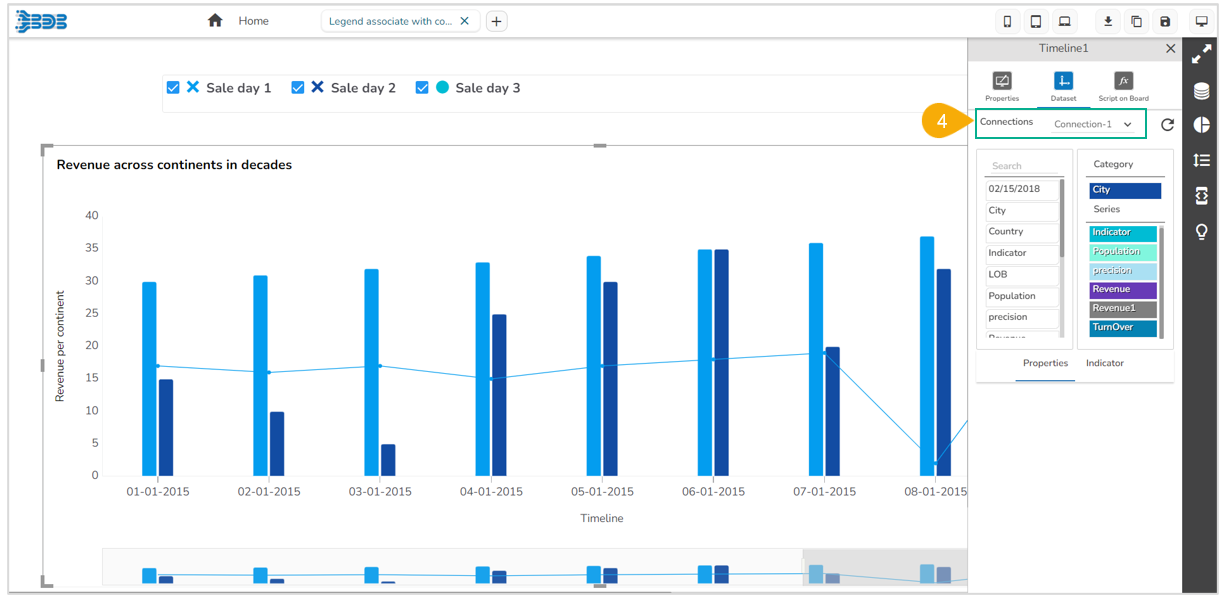
* Associate data connection with the chart.

<figure><img src="https://859511478-files.gitbook.io/~/files/v0/b/gitbook-x-prod.appspot.com/o/spaces%2FGDmsjfjJBNqow7Fo97cO%2Fuploads%2FPTjdiwOuITtCrp49r2eV%2Fimage.png?alt=media&#x26;token=8c453ccf-5f73-4196-b34d-0cb1bcd1e612" alt=""><figcaption></figcaption></figure>

* Select and drag the ***Legend*** component from the ***Other*** tab of the component library.

<figure><img src="https://859511478-files.gitbook.io/~/files/v0/b/gitbook-x-prod.appspot.com/o/spaces%2FGDmsjfjJBNqow7Fo97cO%2Fuploads%2FXhB4nRZa339SvwZkmUyY%2Fimage.png?alt=media&#x26;token=d664bd7b-fe39-4385-998b-87f2575e2242" alt=""><figcaption></figcaption></figure>

* Navigate to the ***Legend*** component properties.
* Go to the ***General*** properties.
* Click on the ***Associate Chart*** and select the required chart.

<figure><img src="https://859511478-files.gitbook.io/~/files/v0/b/gitbook-x-prod.appspot.com/o/spaces%2FGDmsjfjJBNqow7Fo97cO%2Fuploads%2FJrgcMLZmZgGtX9tpKxSM%2Fimage.png?alt=media&#x26;token=c75d83d3-8727-4065-a5da-843ea951a105" alt=""><figcaption></figcaption></figure>

* The ***Associated Chart*** wizard opens.
* Select the dragged chart from the ***Search available components*** section.
* Select the fields that you wish to associate by using the checkmarks given next to the fields from the ***Search available field***&#x73; section.
* Click the ***Save*** option.

![](https://859511478-files.gitbook.io/~/files/v0/b/gitbook-x-prod.appspot.com/o/spaces%2FGDmsjfjJBNqow7Fo97cO%2Fuploads%2F8eqGHZTQ22jefwLnvrad%2Fimage.png?alt=media\&token=1328070a-ca9c-4c6d-a3ef-94cf97cb5153)​

* The ***Legend*** gets mapped to the chart.