# Form Response
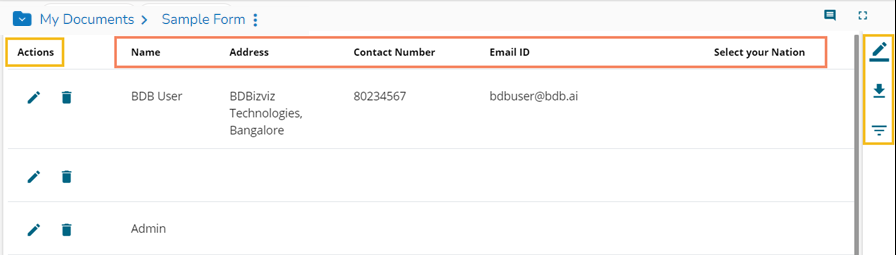
The Form Response module contains all the responses given by the users in a tabular format. The collected responses can be further filtered by Page, Date, or Users. The users can edit the collected responses as well. The list of responses may change according to the user. The ordinary users get to see the responses given by them while the admin/ owner of the form gets to see all the responses given by all the users. The Form Response page can be used to verify the data.
* The Preview page of the Form opens with an option to respond to the question once the Form is published.
* Respond to the question.
* Click the ***Submit*** option.
* An acknowledge message appears to inform that the shared response has been saved. (The user can also use the ***Save*** icon to save a response.)
* Click on the link ***Click here to view the response*** or ***View Response*** icon.
* All the collected responses appear in the tabular format.
* The admin can further ***Edit*** or ***Delete*** the collected responses by using the icons given under the ***Actions*** column.
* Click the ***Export in Excel*** icon to download the responses in an excel file.
* Click the ***Filter Response*** option to filter the responses. The user gets the following options to filter the responses:
* Page
* Date
* Users
---
# Agent Instructions: Querying This Documentation
If you need additional information that is not directly available in this page, you can query the documentation dynamically by asking a question.
Perform an HTTP GET request on the current page URL with the `ask` query parameter:
```
GET https://docs.bdb.ai/forms-4/general-workflow-for-forms/form-response.md?ask=
```
The question should be specific, self-contained, and written in natural language.
The response will contain a direct answer to the question and relevant excerpts and sources from the documentation.
Use this mechanism when the answer is not explicitly present in the current page, you need clarification or additional context, or you want to retrieve related documentation sections.