> For the complete documentation index, see [llms.txt](https://docs.bdb.ai/data-science-lab-2/llms.txt). Markdown versions of documentation pages are available by appending `.md` to page URLs; this page is available as [Markdown](https://docs.bdb.ai/data-science-lab-2/project/tabs-for-a-data-science-lab-project/tabs-for-tensorflow-and-pytorch-environment/notebook/notebook-page/notebook-operations/models/registering-and-unregistering-a-model.md).
# Registering & Unregistering a Model
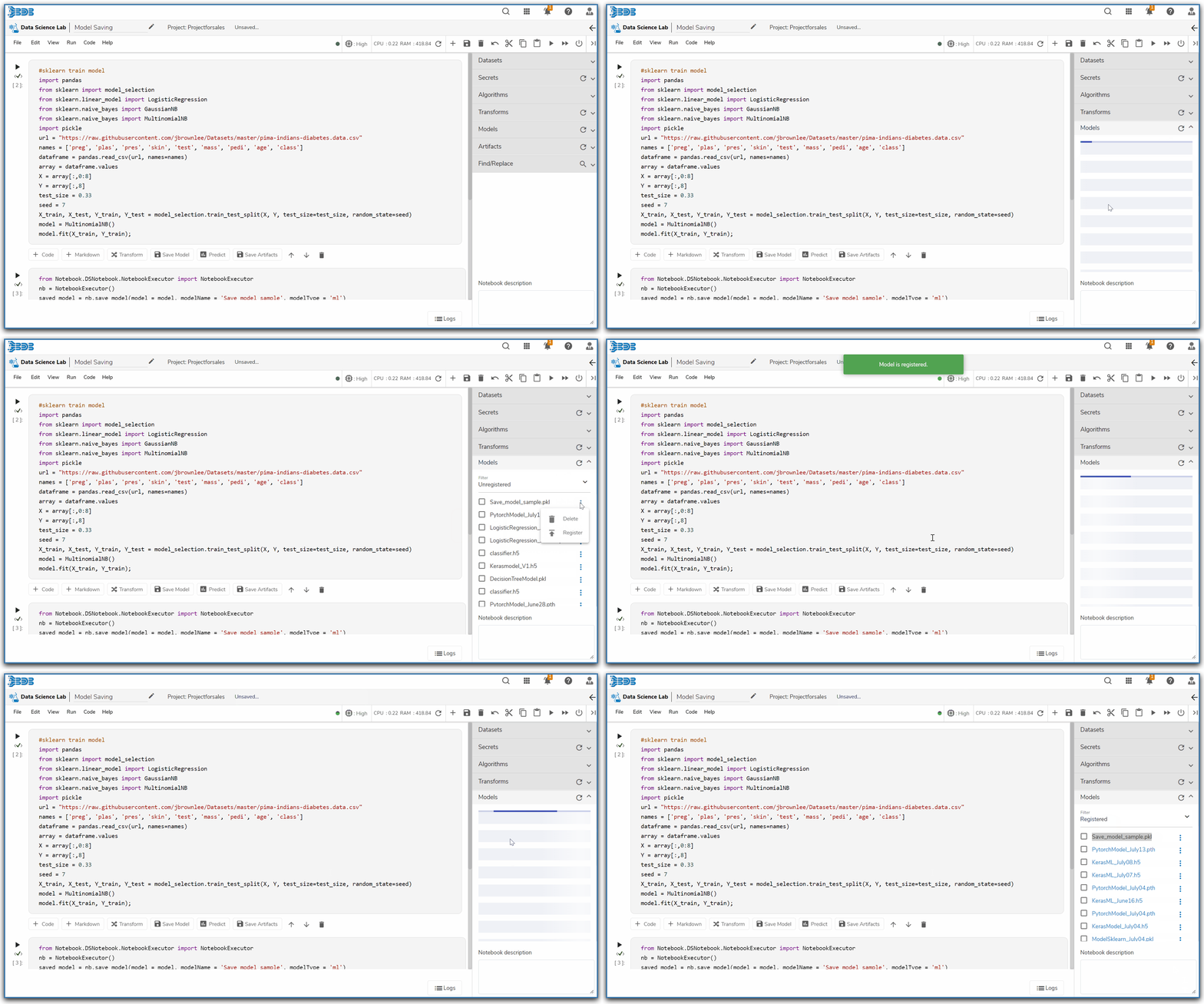
Register a DSL Model from the Notebook tab
{% hint style="info" %}
*Check out the walk-through on how to register a DSL Model.*
{% endhint %}
Registering a Model from the Notebook tab
## Registering a DSL Model
* **Navigate** to the **Models** tab provided on a Notebook page.
* Select the ***Unregister*** filter option to get the list of all the unregistered model below.
* Select a model from the list.
* Click the Ellipsis icon.
* Click the ***Register*** option from the displayed menu.

* The ***Register Model*** dialog box opens.
* Click the ***Yes*** option.

* The concerned saved model gets registered.
Notification message after the Model gets registered
* The name of the registered model appears in purple color.

* [ ] The Registered model can be accessed under the Registered filter using the [***Model***](/data-science-lab-2/project/tabs-for-a-data-science-lab-project/tabs-for-tensorflow-and-pytorch-environment/model.md) tab.
Registered Model under the Model tab
* [ ] The registered model can be accessed under the Data Science Lab Model load runner component of the Data Pipeline as displayed in the below given image).
Consuming the registered DS Lab model in the Data Pipeline module
Read the **DS Lab Model Runner component** of the **Data Pipeline** user document to know more about it.
## Unregistering a DSL Model
The user can also Unregister a registered model from the Notebook page. The steps for the same are given below:
* **Navigate** to the **Models** tab provided on a Notebook page.
* Select the ***Register*** filter option to get the list of all the unregistered model below.
* Select a model from the list.
* Click the Ellipsis icon.
* Click the ***Unregister*** option from the displayed menu.

* The **Unregister** dialog box opens.
* Click the **Yes** option.

* A notification message appears to convey the success of the action.
* The concerned model gets unregistered.

{% hint style="info" %}
*Please Note*:
* *Read the **DS Lab Model Runner component** of the **Data Pipeline** user document to know more about it.*
* *Refer the **Data Science Lab Quick Start Flow** page to get an overview of the **Data Science Lab** module in nutshell.* [***Click here***](/data-science-lab-2/data-science-lab-quick-start-flow.md) *to get redirected to the quick start flow page.*
{% endhint %}