# Unregister A Model

{% hint style="info" %}
*Check out the walk through on how to unregister a model using the **Model** tab.*
{% endhint %}

<figure><img src="https://859511478-files.gitbook.io/~/files/v0/b/gitbook-x-prod.appspot.com/o/spaces%2FGDmsjfjJBNqow7Fo97cO%2Fuploads%2FK3PL2wCBA5VufXZb4ERz%2FUnregister%20model.gif?alt=media&#x26;token=7e8d3c6b-2e80-4191-b46f-7ea07a46e068" alt=""><figcaption></figcaption></figure>

You can remove a deployed model from the Data Pipeline by using the ***Model*** tab.

* Navigate to the ***Model*** tab.
* Select a deployed model (use the ***Registered*** filter option to access a model).
* Click the ***Unregister*** icon.

<figure><img src="https://859511478-files.gitbook.io/~/files/v0/b/gitbook-x-prod.appspot.com/o/spaces%2FGDmsjfjJBNqow7Fo97cO%2Fuploads%2Fz9HntSS2stz30ddCvPBi%2Fimage.png?alt=media&#x26;token=1101a067-fa7e-4509-b713-7f774052434d" alt=""><figcaption><p>The Unregister option given in the Model list</p></figcaption></figure>

* The ***Unregister*** dialog box appears to confirm the action.
* Click the ***Yes*** option.

![](https://859511478-files.gitbook.io/~/files/v0/b/gitbook-x-prod.appspot.com/o/spaces%2FGDmsjfjJBNqow7Fo97cO%2Fuploads%2FpG16MSm3qp8i5X031R0M%2Fimage.png?alt=media\&token=eaa5a60f-a2f4-4c8f-8b33-464c930bcae6)

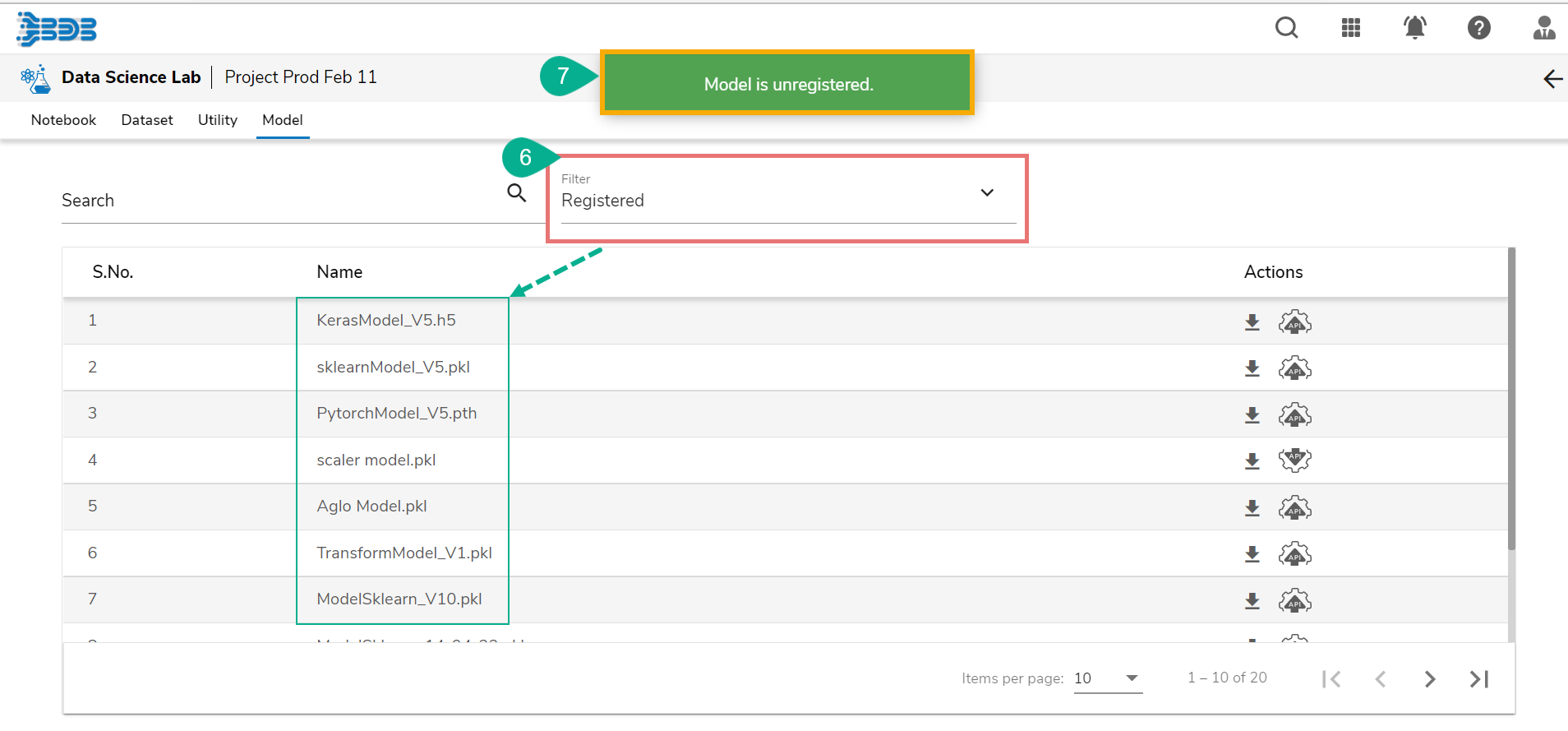
* The model gets removed from the Data Pipeline plugin (it disappears from the ***Registered*** list of the models).
* A notification message appears to inform the same.

<figure><img src="https://859511478-files.gitbook.io/~/files/v0/b/gitbook-x-prod.appspot.com/o/spaces%2FGDmsjfjJBNqow7Fo97cO%2Fuploads%2FC1GTNrbWhWRdYMA5D8As%2Fimage.png?alt=media&#x26;token=da2d9363-e9a2-4c53-86f6-5087b25c48c6" alt=""><figcaption><p>Confirmation message after the model gets unregistered.</p></figcaption></figure>

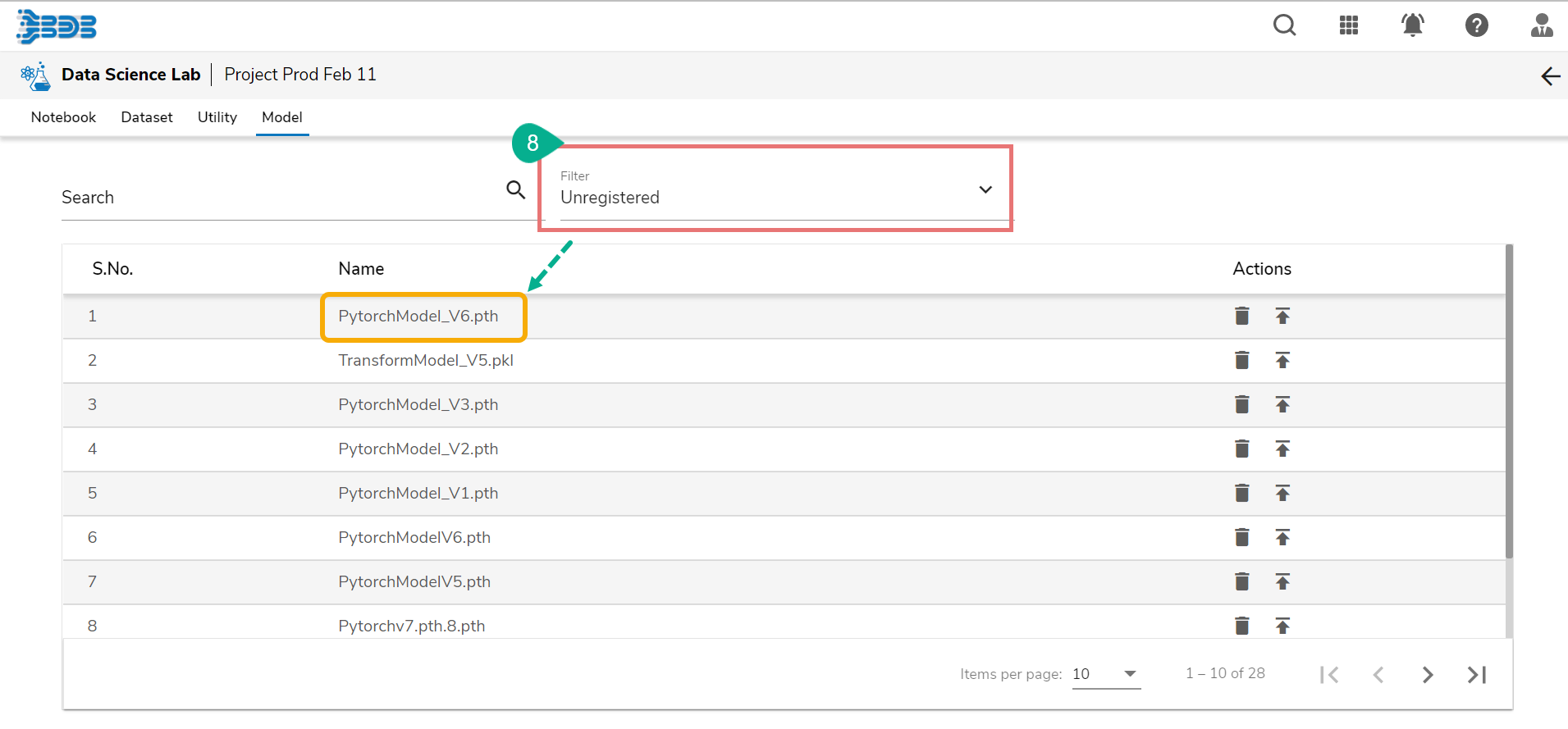
* The model that has been unregistered from the Pipeline appears under the ***Unregistered*** filter.

<figure><img src="https://859511478-files.gitbook.io/~/files/v0/b/gitbook-x-prod.appspot.com/o/spaces%2FGDmsjfjJBNqow7Fo97cO%2Fuploads%2FnR4jAGct1OyoxXaodhRa%2Fimage.png?alt=media&#x26;token=be8fde72-5e96-4082-865d-97ed84f25a13" alt=""><figcaption><p>The model displays under the Unregistered list of models</p></figcaption></figure>

{% hint style="info" %}
*<mark style="color:green;">Please Note:</mark> Refer the **Data Science Lab Quick Start Flow** page to get an overview of the **Data Science Lab** module in nutshell.* [***Click here***](https://docs.bdb.ai/data-science-lab-2/data-science-lab-quick-start-flow) *to get redirected to the quick start flow page.*
{% endhint %}


---

# Agent Instructions: Querying This Documentation

If you need additional information that is not directly available in this page, you can query the documentation dynamically by asking a question.

Perform an HTTP GET request on the current page URL with the `ask` query parameter:

```
GET https://docs.bdb.ai/data-science-lab-2/project/tabs-for-a-data-science-lab-project/tabs-for-tensorflow-and-pytorch-environment/model/unregister-a-model.md?ask=<question>
```

The question should be specific, self-contained, and written in natural language.
The response will contain a direct answer to the question and relevant excerpts and sources from the documentation.

Use this mechanism when the answer is not explicitly present in the current page, you need clarification or additional context, or you want to retrieve related documentation sections.