# API Connector
The user can call data from the API services using the API Connector.

Provide the following information to create an API Data Connector:
* Click the ***New*** button
* Click the ***API Connector*** icon from the Data Connector page.
* The API Connector page opens.
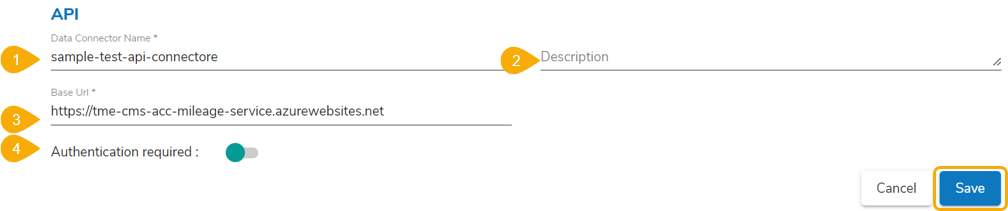
* API Name: Provide a name for the API connector.
* The API Connector page opens.
* API Name: Provide a name for the API connector.
* Description: Describe the API connector.
* Base URL: Provide URL of the API from where you want to fetch the data.
* Select Open Id: Select an open id using the drop-down menu.
* Click the ***Save*** option.
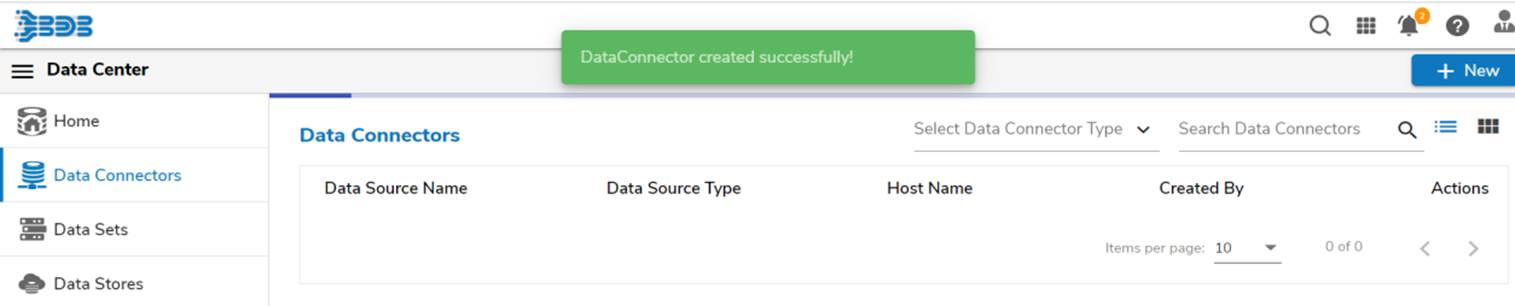
* A notification message appears, and the new API Connector gets saved under the Data Connector list.
{% hint style="info" %}
*Please Note: If the API requires authentication, you can configure it via the Open ID Settings and map it in the API Connector using the **Select Open Id** field.*
{% endhint %}
---
# Agent Instructions: Querying This Documentation
If you need additional information that is not directly available in this page, you can query the documentation dynamically by asking a question.
Perform an HTTP GET request on the current page URL with the `ask` query parameter:
```
GET https://docs.bdb.ai/data-center-4/data-center/data-connectors/supported-data-connectors/api-connectors/api-connector.md?ask=
```
The question should be specific, self-contained, and written in natural language.
The response will contain a direct answer to the question and relevant excerpts and sources from the documentation.
Use this mechanism when the answer is not explicitly present in the current page, you need clarification or additional context, or you want to retrieve related documentation sections.